Digital Membership Cards
Please note that we will no longer send digital membership cards to Audubon members who join or renew after 2024. Membership cards (both digital and paper) will remain valid until the member's regular membership renewal date. Please contact membership@asri.org is you have questions about this change!
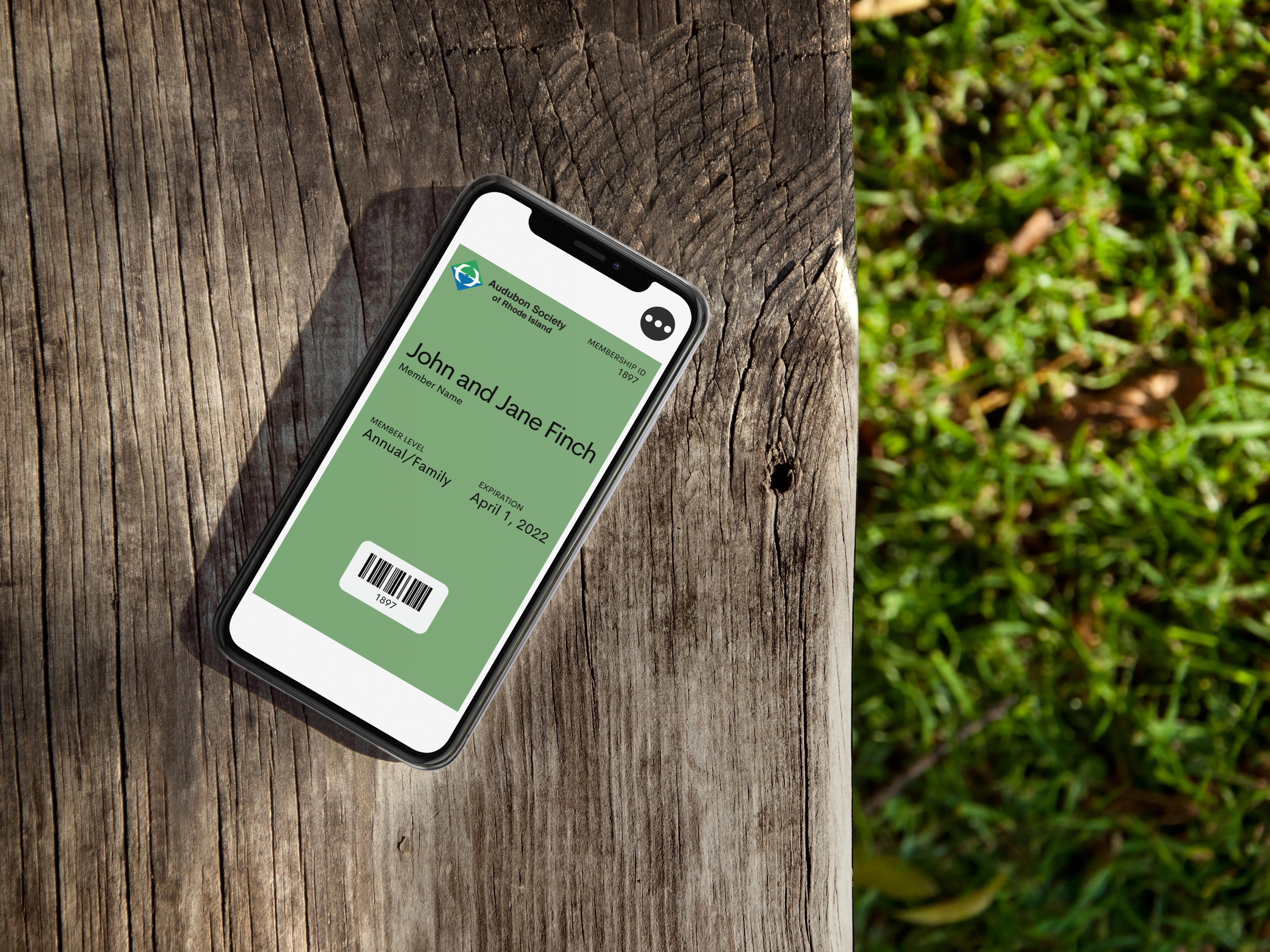
Enjoy a NEW way to access your Audubon Society of Rhode Island membership! Beginning in April of 2021, Audubon Members will receive digital membership cards, a convenient, eco-friendly alternative to printed cards.
Digital membership cards provide quick links to our website, information on your membership benefits, Audubon contact information and helpful renewal notifications all in one place - your fingertips!
Check out our digital membership card FAQ, below!
Frequently Asked Questions
Why Digital Membership Cards?
Beginning in April of 2021, the Audubon Society of Rhode Island now offers digital membership cards, which can be downloaded and saved to your smartphone. Going digital means you never have to worry about forgetting your membership card when visiting the Audubon Nature Center and Aquarium. These cards reduce paper use, allow more of your membership donation to support our mission, and cut carbon emissions because they don't have to be mailed. After joining Audubon, you will receive an email within a week with a link to download your card.
How do I add the membership card to my iPhone?
Access the email from your smartphone and click the "Download" button, then click "Add to Wallet" and "Add." The card will automatically go to your iPhone’s Apple Wallet. It can be accessed in Wallet at any time.
How do I add the membership card to my Android phone?
Android users need to download Wallet Passes from Google Play. After you have the app, access the email from your smartphone and click “Download” in the membership email, and the card will automatically go to your Wallet Passes app, where it can be accessed at any time.
I downloaded my card but I can’t find it.
If you have an iPhone, the card will automatically download to Apple Wallet. Check the app for your new card (scroll through any cards that are already there--it may be hiding!). If you have an Android, you’ll need to download Wallet Passes from the Play Store prior to downloading the card.
I am not sure I received my digital card. Can you send it again?
Yes! Your digital card is sent to you via email; you may need to check your email's Promotional, Junk, Unwanted or Spam folder(s). If you still don't see it, please contact membership@asri.org so we can resend the email containing the download link. All active Audubon members upon our initial launch in April of 2021 would have received the email containing the download link. For all new members after this date, know that it can take around one week to receive the email after we receive your information.
I’d prefer not to use this digital membership card, what should I do?
By default, all members will now receive a digital membership card sent to the email address you provide. If you prefer to receive a paper card instead, please contact membership@asri.org.
I don’t have a mobile phone, what can I do?
Please contact membership@asri.org for a paper card.
I have a question about my membership benefits.
Your digital membership card includes convenient information on the benefits of membership:
For Android users: Open the digital card (you will find it inside of the "Wallet Passes" app) and navigate to the back of the card by tapping the small “i” icon. Scroll down to find information on membership benefits.
For iPhone users: Open the digital card (you will find it inside of a pre-installed app called "Wallet") and tap on the "three dots" icon at the top side of the screen. Scroll down to find information on membership benefits.
You may also contact membership@asri.org if your question or concern is not addressed on your digital membership card!
My name is spelled wrong/membership level is incorrect.
Please contact membership@asri.org to correct any information.
Can I update the email address(es) associated with my membership?
Yes! Please contact membership@asri.org to make corrections.
My family member is on this membership account also, how can she/he receive the card?
For Android users: Open the digital card (you will find it inside of the "Wallet Passes" app) and navigate to the back of the card by tapping the small “i” icon. Then, tap the “Share Pass” button to see the sharing options and share the card to your secondary member.
For iPhone users: Open the digital card (you will find it inside of a pre-installed app called "Wallet") and tap on the "three dots" icon at the top side of the screen. Then, tap the "square with an arrow pointing up" icon at the top right side of the screen to see the sharing options and share the card to your secondary member.
How do I enable the membership renewal notifications associated with my digital card?
For Android users: Open the digital card (you will find it inside of the "Wallet Passes" app) and navigate to the back of the card by tapping the small “i” icon. Tap the "Notifications" button to turn notifications on for that pass.
For iPhone users: Open the digital card (you will find it inside of a pre-installed app called "Wallet") and tap on the "three dots" icon at the top side of the screen. Tap the "Notifications" button to turn notifications on for that pass.